


Wedding QR codes for photos make it easy to collect all the candid pictures and videos your guests take throughout the day. But creating your QR code is only the first step. Guests also need to notice it and understand exactly what they should do with it.
The good news is that your QR code doesn’t have to look awkward or out of place at your venue. You can incorporate it into your signs, reception tables, and other wedding details while still matching the look of your day.
Let's take a look at creative ways to display wedding QR codes for photos, tips for encouraging more uploads, and an easy way to customize your own.
Why Your Wedding QR Code Placement Matters
A QR code hidden in the corner of your reception probably won’t collect many photos. Your guests can’t scan something they never notice!
Instead of relying on one sign, place your QR code in two or three spots where guests will naturally spend time throughout the night. It also helps to include clear instructions so they immediately know that the code is for uploading wedding photos and videos.
With Guestlense, the QR code takes guests directly to a private upload gallery. There’s no app to download and no complicated process to figure out, so guests can upload their pictures and get right back to celebrating.
.png)
Creative Ways to Display Wedding QR Codes for Photos
Add Your QR Code to the Welcome Sign
One of the best times to introduce your wedding photo QR code is when guests first arrive.
Add it directly to your welcome sign or place a smaller coordinating sign beside it. This lets everyone know early on that you want them to take photos and share their view of the day with you.
Just make sure the wording clearly explains where the QR code leads. That way guests don’t assume it links to your wedding website, schedule, or seating chart.
You could also ask your officiant to mention the QR code after the ceremony or have your DJ give everyone a quick reminder during the reception.
Place QR Code Cards on Reception Tables
Reception table cards are one of the easiest and most effective ways to get more guest photos. Everyone will have time to notice and scan the code while they’re sitting down for dinner.
You could display:
- One framed QR code sign on each table
- A card beside each table number
- Individual cards at each place setting
Display It at the Bar
The bar gets plenty of repeat traffic throughout cocktail hour and the reception, which makes it another great place for your QR code.
Place a framed card on the bar, add the code to your drink menu, or display it next to your signature cocktails. You can even use wording that fits the location, such as:
- “Sip, snap, and share!”
- “Grab a drink and drop your photos here.”
- “Cheers! Scan to share your pictures with us.”
Add It to Your Guest Book Table
Your guest book table is another natural place to display wedding QR codes for photos. Place the code beside your physical guest book or make it part of a digital wedding guest book station. With Guestlense, loved ones can upload photos and videos along with personal messages, giving you even more memories to revisit after the wedding.
A small framed sign, simple instructions, and a few florals or candles can make the QR code feel like an intentional part of the display rather than something that was added at the last minute.
Pair It With Your Wedding Photo Booth
If you’re including a wedding photo booth, this is one of the most obvious places to display your QR code.
Add a sign beside an editorial backdrop, mirror selfie station, or lounge-style photo area. Guests will already be taking photos there, so the QR code gives them a quick way to send those pictures directly to you.
It will also remind them to upload the other selfies, group photos, and candid moments they’ve captured throughout the night.
Encourage Guests With Prompts
Sometimes your guests just need a little inspiration for what to photograph.
Add a few prompts to your QR code signs or table cards, such as:
- Your favorite dance floor moment
- A selfie with someone you just met
- The funniest picture of the night
- A photo of your entire table
- A sweet video message for the couple
Your DJ can also announce one or two prompts during the reception. Keep it light and fun so it feels like part of the celebration, not an item on your guests’ to-do lists.
Send Guests Home With the QR Code
Your guests don’t have to upload everything during the reception. With Guestlense, they can continue adding photos and videos for three months after your wedding date.
Add the QR code to favor tags, hotel welcome bags, or small take-home cards so guests have another chance to upload later. You could also share the gallery link in a post-wedding text or email.
This allows everyone to stay present during the celebration while still giving you a better chance of receiving all the pictures sitting in their camera rolls.
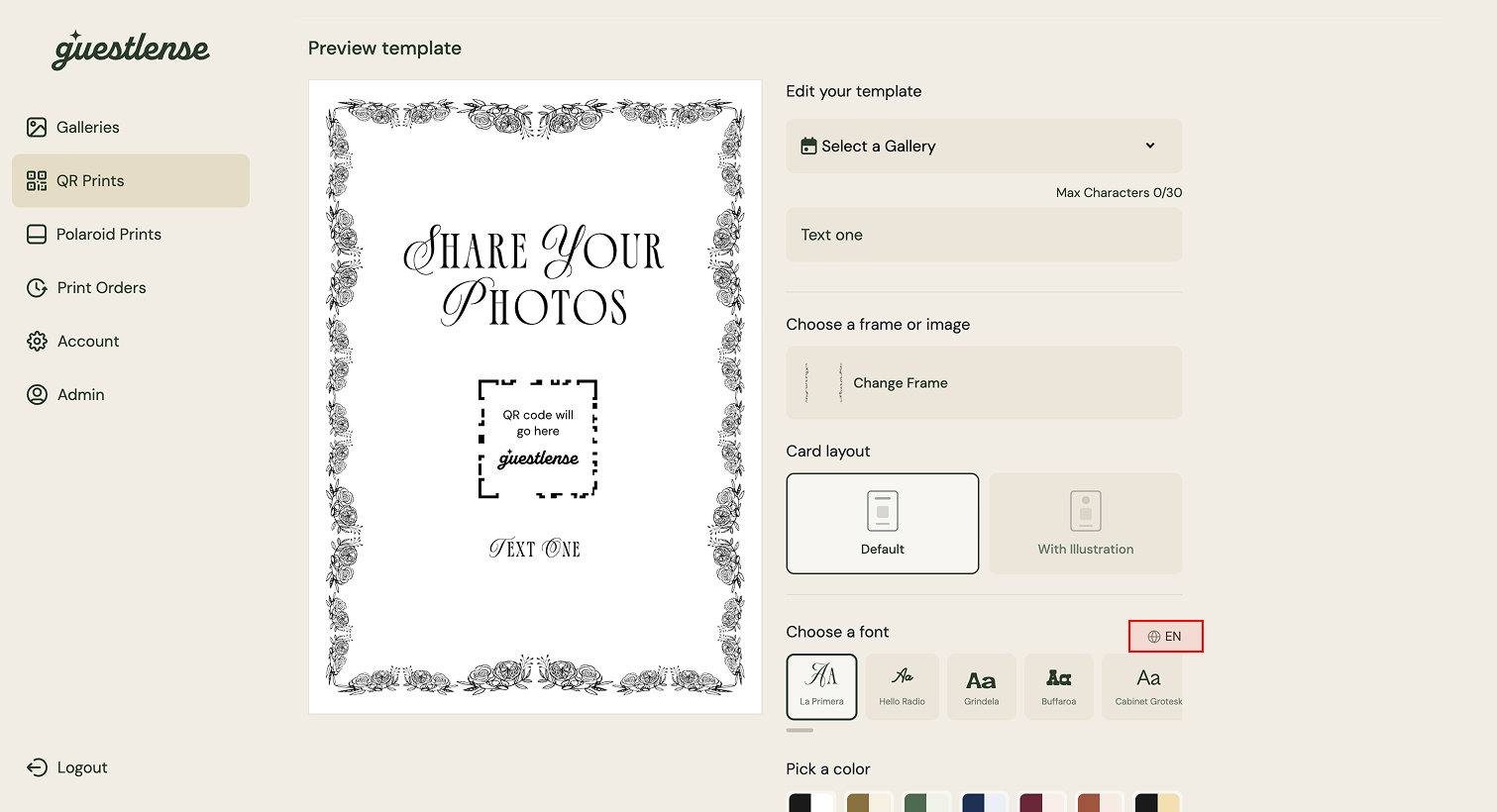
How to Match Wedding QR Code for Photos to Your Wedding Design
The last thing you want is for your QR code cards to look completely out of place beside the rest of your carefully chosen details.
Customizing the card design helps it blend in with your invitations, signs, menus, and reception decor. You can coordinate elements such as:
- Colors
- Fonts
- Borders
- Florals or illustrations
- Your names and wedding date
- A custom message for guests
Whether you prefer a classic black-and-white card or something colorful and bold, Guestlense gives you 30+ different templates to choose from. Simply customize the design and colors to match your theme, then print your cards for guests to scan.
Make It Easy for Guests to Participate
No matter where you display your wedding QR codes for photos, the process should be as easy as possible for your guests.
Here are a few ways to help you collect more pictures and videos:
- Display the QR code in more than one visible location.
- Choose places where guests naturally stop instead of areas they quickly pass.
- Include a clear phrase explaining where the QR code leads.
- Ask your DJ or emcee to make a short announcement during the reception.
- Avoid requiring guests to create an account or download an app.
- Test your printed QR code before the wedding.
Collect More Wedding Photos With Guestlense
The best wedding QR codes for photos are easy to notice, scan, and use. Custom QR code cards help get your guests’ attention, but the upload experience needs to be just as simple.
With Guestlense, your custom QR code connects guests directly to a private gallery where they can upload photos and videos without downloading an app. You’ll get to relive your top moments, the ones you missed, and everything your favorite people captured in between.
Ready to start collecting your guests’ photos? Create your custom wedding QR code with Guestlense, choose a design that fits your day, and let your guests take it from there.
